
Download
No. For privacy reasons related to the rider featured in the video, downloads are available exclusively to the rider.
Even if you are the horse owner, the download and distribute right’s of the video belongs to the rider, as the person directly represented in the footage.
If you would like to receive the video, we recommend contacting the rider and asking them to download it and share it with you directly.
To download your video, you must first access it from your personal account.
-
Log in to your account on the website.
-
Go to your personal profile area, where your videos are listed.
-
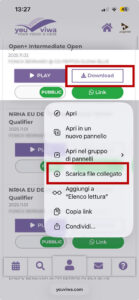
Locate the video and tap the Download button.
If you are using an iPhone, the download process works slightly differently:
-
Press and hold the Download button for a few seconds.
-
A menu will appear on the screen.
-
Tap “Download Linked File” .
-
The video will be saved automatically in the Files app on your iPhone.
After the download is complete, you can find the file inside the Files application, usually in the Downloads folder.
Where can I find the download and share button?
To download your video, you must first log in to your account on the website.
The Download and Share button is available only inside your personal profile area.
Here’s how to find it:
-
Log in to your account.
-
Go to your personal profile.
-
Open the section where your videos are listed.
-
You will find the Download and Share button next to each available video.
Please note that the download option is visible only to the rider featured in the video. If you do not see the button, it may be due to privacy settings or account permissions.
Find videos
There are several ways to find what you’re looking for:
-
If you are a rider or a horse owner, you can access the videos directly from your personal profile area after logging in.
-
You can start from the show page, where you will find the list of classes and draw orders.
-
You can also search for videos directly using the search area, by typing the name of the horse or the rider.
All competition videos are published at the end of the event, according to the technical time required for processing. If you cannot find the video of your class, there may be several reasons:
- The video upload process has not yet been completed. In this case, we recommend visiting the page again later and refreshing your browser to update the content.
- Publication consent has not been granted. Riders can choose whether to make their videos public or private.
- Other technical reasons. In this case, we recommend contacting us for further clarification so we can try to resolve the issue.
Video privacy respects the rider featured in the video. The rider has the right to choose whether the video is public or private.
Videos with your horse will always appear in your personal area, even if the run was performed by a different rider.
If the rider has set the video to private, you may see it listed in your horse’s runs, but you will not be able to watch or access it.
For privacy reasons related to the rider, horse owners are not allowed to download the videos. Only the rider has the right to download the video and decide whether to share it.If you cannot view a video, we recommend contacting the rider directly and asking them to either share the video with you (for example via WhatsApp) or make it public.
General Information
Youviwa.it is a service by VIWA, a company specialized in video production and media services for sports events.
On the Events page, you can find the complete calendar of shows… and many more will be added soon!
Mistake
If the video has been published but does not start playing, there may be a technical issue.
First, please check the internet connection of the device you are using to watch the video. A slow or unstable connection can prevent proper playback.
If the problem persists, we kindly ask you to contact us so our team can carry out further checks and assist you.
The removal of a video from Youviwa.it is always possible in compliance with European privacy regulations.
Such a request can only be submitted by the rider featured in the video. If you are the rider concerned, please contact us complete this form with all the required information so we can proceed with the removal of the video.
Publishing and sharing
The publication of full-length videos on websites other than Youviwa.it is subject to the explicit authorization of VIWA, as the holder of all production rights.
If you wish to use a video on your website, please contact us and provide:
-
The specific video you would like to publish
-
The website URL where it will be published
-
Details about the type and context of publication
Our team will review your request and get back to you with the necessary information and conditions.
To share your video, you must first log in to your account on the website.
After logging in, go to your personal profile area, where all your videos are listed. For each video, you will find the available sharing options.
You can:
-
Download the video directly to your device.
-
Send the video link via WhatsApp using the dedicated button.
This allows you to easily share your performance with friends, family, trainers, or on your social channels.
Using your personal account
Only the rider featured in the video can modify its privacy settings.
After logging in, go to your personal profile area. Next to each video, you will find a button that allows you to switch the status from “Private” to “Public.”
You can change the privacy setting at any time and switch it back whenever you wish.
Yes, we have considered this situation.
Please contact our support team or fill out the dedicated form with all the required information. We will take care of creating a single account that allows all members of your family to access their videos from one shared profile.
If you have requested a password reset but have not received the email, please follow these steps:
-
Check your spam or junk folder.
Sometimes automated emails are filtered by your email provider. -
Make sure you entered the correct email address.
The reset link is sent only to the email address associated with your account. -
Wait a few minutes and try again.
In some cases, email delivery may take a short time.
If you still do not receive the reset email after these checks, please contact our support team. We will verify your account and assist you in restoring access.