

To download your video, you must first access it from your personal account.
-
Log in to your account on the website.
-
Go to your personal profile area, where your videos are listed.
-
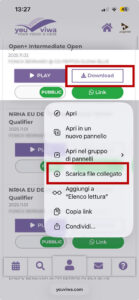
Locate the video and tap the Download button.
If you are using an iPhone, the download process works slightly differently:
-
Press and hold the Download button for a few seconds.
-
A menu will appear on the screen.
-
Tap “Download Linked File” .
-
The video will be saved automatically in the Files app on your iPhone.
After the download is complete, you can find the file inside the Files application, usually in the Downloads folder.